Buy instantpay.eu ?
We are moving the project
instantpay.eu .
Are you interested in purchasing the domain
instantpay.eu ?
domain@kv-gmbh.de · 0541-91531010
Buy instantpay.eu ?
Is instant transfer on Steam secure?
Yes, instant transfer on Steam is secure. Steam uses industry-standard encryption and security measures to protect users' personal and financial information. Additionally, Steam offers two-factor authentication to further enhance account security. However, it is important for users to be cautious and protect their account credentials to prevent unauthorized access. Overall, Steam's instant transfer feature is considered secure for users to use. **
Is instant bank transfer on eBay Kleinanzeigen secure?
Instant bank transfer on eBay Kleinanzeigen is generally secure, as it is processed through trusted payment service providers such as PayPal or Stripe. These providers use encryption and other security measures to protect users' financial information. However, as with any online transaction, it is important for users to be cautious and only make payments to verified and reputable sellers. It is also advisable to avoid sharing sensitive banking information directly with the seller and to use secure payment methods whenever possible. **

Similar search terms for IOS
Top-Angebote
Products related to IOS:
-
Inspire Curations Water Soluble Embroidery Stabilizer Transfer Paper eBring detailed embroidery ideas to life with less tracing and cleaner results using this water soluble embroidery stabilizer. Designed as a temporary stitching guide and support layer, it lets you draw or transfer your pattern before embroidering...43,00 $*Shipping: 0,00 $Secure redirect to the provider
-
Value Selection 1400W Pull Out Heat Press Machine 15x15 Digital Shirt Transfer Press 1400W Pull Out Heat Press Machine 15x15 Digital Shirt Transfer PressThis 15x15 heat press machine offers efficient heat transfers for customized craft projects and small business applications. Equipped with precise digital temperature control, it allows you to easily customize time and temperature settings to match...569,97 $*Shipping: 0,00 $Secure redirect to the provider
-
Tools, Home & Hobby 12x10 Inch T Shirt Heat Press Machine Digital Sublimation Transfer Press 12x10 Inch T Shirt Heat Press Machine Digital Sublimation Transfer PressCreate professionalquality designs with ease using this reliable t shirt heat press machine built for creators, small businesses, and DIY enthusiasts. Designed for smooth heat transfer on apparel and flat items, it delivers consistent results with...197,97 $*Shipping: 0,00 $Secure redirect to the provider
-
GreatGadgets LLC Electric Fluid Transfer Pump Electric Fluid Transfer PumpDo you find it hard to transfer noncorrosive liquid from one gadget to another If that's the case, this Electric Fluid Transfer Pump will be a great choice for you. With a single button switch, this pump helps you put gas, water, petrol, or other...28,97 $*Shipping: 0,00 $Secure redirect to the provider


-
Can you transfer Android game progress to iOS?
Unfortunately, it is not possible to transfer Android game progress directly to iOS. This is because the game progress data is stored in different formats and locations on the two operating systems. However, some game developers may offer cross-platform syncing or cloud saving features that allow you to continue your progress on a different device. It's best to check with the specific game developer to see if this feature is available for the game you are playing. **
-
How can I transfer Sims from Android to iOS?
Unfortunately, it is not possible to transfer Sims from an Android device to an iOS device. The two operating systems are not compatible in terms of transferring game data. You will need to start a new game on your iOS device if you want to play Sims on that platform. **
-
How do I transfer ColorNote from Android to iOS?
Unfortunately, ColorNote is not available for iOS devices. However, you can try to find a similar note-taking app on the App Store that offers similar features and functionality. Some popular note-taking apps for iOS include Evernote, OneNote, and Apple Notes. You can manually transfer your notes from ColorNote on your Android device to the new note-taking app on your iOS device by copying and pasting the content. **
-
How can you transfer data from iOS to Android?
One way to transfer data from iOS to Android is by using a third-party app like "Move to iOS" or "SHAREit." These apps allow you to transfer various types of data such as contacts, messages, photos, videos, and more from your iOS device to your Android device wirelessly. Another option is to use cloud storage services like Google Drive or iCloud to upload your data from your iOS device and then download it onto your Android device. Additionally, you can manually transfer data by connecting both devices to a computer and copying the files over. **


How can one transfer data from iOS to Android?
One way to transfer data from iOS to Android is by using a third-party app like Google Drive or Dropbox to upload the data from your iOS device and then download it onto your Android device. Another option is to use a computer to transfer the data by connecting both devices and manually moving the files over. Additionally, some apps like WhatsApp offer built-in features to transfer data between different operating systems. **
How can I transfer my Android data to iOS?
You can transfer your Android data to iOS using the "Move to iOS" app, which is available on the Google Play Store. This app allows you to transfer your contacts, message history, photos and videos, web bookmarks, mail accounts, and calendars from your Android device to your new iOS device. Simply download the app on your Android device, follow the on-screen instructions to connect to your new iOS device, and select the data you want to transfer. This process will help you seamlessly transition from Android to iOS while keeping all your important data intact. **
Top-Angebote
Products related to IOS:
-
Uplift Picks Knitting Machine Transfer Comb Set For Fast Precise Stitch Moving Knitting Machine Transfer Comb Set For Fast Precise Stitch MovingMove multiple stitches with better control and less repetitive work during machine knitting. This 4 piece knitting machine transfer comb set includes 5, 6, 7, and 10 needle tools for different stitch transfer needs. Each needle transfer tool...125,00 $*Shipping: 0,00 $Secure redirect to the provider
-
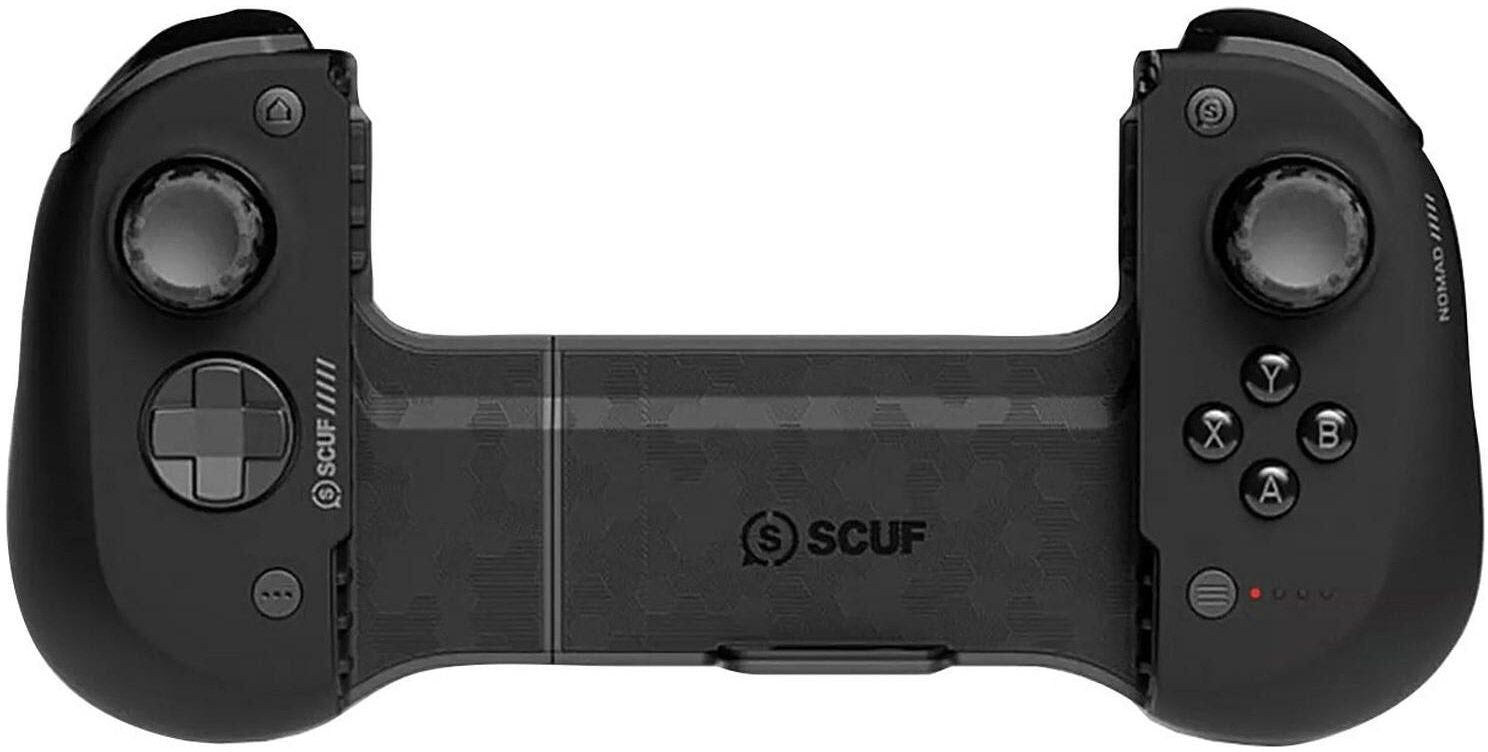
Scuf Nomad Mobile Controller for iOS - Black, NewThe Scuf Nomad Mobile Controller for iOS is designed to bring console-quality precision and comfort to mobile gaming. Built for iPhone and iPad users, this controller is packed with features like Hall effect thumbsticks, customizable rear paddles, and an ergonomic design that ensures long-lasting gameplay without hand fatigue. Key Features iOS Compatibility: Specifically designed for use with iPhone and iPad devices, ensuring a seamless connection and optimal performance. Ergonomic Design: Engineered to prevent hand strain during extended gaming sessions, offering maximum comfort for marathon gameplay. Hall Effect Thumbsticks: Equipped with anti-drift technology to maintain precise control and long-lasting performance. Customizable Controls: Assign key functions to two rear paddles for faster and more efficient gameplay. Gameplay Recording & Sharing: Use the free companion app to capture, save, and share your favorite gaming moments effortlessly. Extended Battery Life: Enjoy up to 16 hours of uninterrupted playtime on a single charge, ideal for gaming on the go. Case-Friendly Design: Works with many iPhone and iPad cases without compromising functionality or performance. Dimensions Depth: 202 mm Height: 51 mm Width: 106 mm Why Choose the Scuf Nomad Mobile Controller? ✔️ Precision control with anti-drift thumbsticks for competitive gaming ✔️ Customizable rear paddles for faster reactions and personalized gameplay ✔️ Comfortable ergonomic design for long gaming sessions without fatigue ✔️ 16-hour battery life for uninterrupted play on the go ✔️ Seamless compatibility with iPhone and iPad devices Upgrade your mobile gaming experience with the Scuf Nomad Mobile Controller for iOS. Whether you’re playing competitive shooters, racing games, or RPGs, this controller delivers the precision, comfort, and customization needed to enhance your gameplay. Order yours today and take mobile gaming to the next level!27,99 £*Shipping: 0,00 £Secure redirect to the provider
-
Inspire Curations Water Soluble Embroidery Stabilizer Transfer Paper eBring detailed embroidery ideas to life with less tracing and cleaner results using this water soluble embroidery stabilizer. Designed as a temporary stitching guide and support layer, it lets you draw or transfer your pattern before embroidering...43,00 $*Shipping: 0,00 $Secure redirect to the provider
-
Value Selection 1400W Pull Out Heat Press Machine 15x15 Digital Shirt Transfer Press 1400W Pull Out Heat Press Machine 15x15 Digital Shirt Transfer PressThis 15x15 heat press machine offers efficient heat transfers for customized craft projects and small business applications. Equipped with precise digital temperature control, it allows you to easily customize time and temperature settings to match...569,97 $*Shipping: 0,00 $Secure redirect to the provider
-
Is instant transfer on Steam secure?
Yes, instant transfer on Steam is secure. Steam uses industry-standard encryption and security measures to protect users' personal and financial information. Additionally, Steam offers two-factor authentication to further enhance account security. However, it is important for users to be cautious and protect their account credentials to prevent unauthorized access. Overall, Steam's instant transfer feature is considered secure for users to use. **
-
Is instant bank transfer on eBay Kleinanzeigen secure?
Instant bank transfer on eBay Kleinanzeigen is generally secure, as it is processed through trusted payment service providers such as PayPal or Stripe. These providers use encryption and other security measures to protect users' financial information. However, as with any online transaction, it is important for users to be cautious and only make payments to verified and reputable sellers. It is also advisable to avoid sharing sensitive banking information directly with the seller and to use secure payment methods whenever possible. **
-
Can you transfer Android game progress to iOS?
Unfortunately, it is not possible to transfer Android game progress directly to iOS. This is because the game progress data is stored in different formats and locations on the two operating systems. However, some game developers may offer cross-platform syncing or cloud saving features that allow you to continue your progress on a different device. It's best to check with the specific game developer to see if this feature is available for the game you are playing. **
-
How can I transfer Sims from Android to iOS?
Unfortunately, it is not possible to transfer Sims from an Android device to an iOS device. The two operating systems are not compatible in terms of transferring game data. You will need to start a new game on your iOS device if you want to play Sims on that platform. **
Similar search terms for IOS
-
Tools, Home & Hobby 12x10 Inch T Shirt Heat Press Machine Digital Sublimation Transfer Press 12x10 Inch T Shirt Heat Press Machine Digital Sublimation Transfer PressCreate professionalquality designs with ease using this reliable t shirt heat press machine built for creators, small businesses, and DIY enthusiasts. Designed for smooth heat transfer on apparel and flat items, it delivers consistent results with...197,97 $*Shipping: 0,00 $Secure redirect to the provider
-
GreatGadgets LLC Electric Fluid Transfer Pump Electric Fluid Transfer PumpDo you find it hard to transfer noncorrosive liquid from one gadget to another If that's the case, this Electric Fluid Transfer Pump will be a great choice for you. With a single button switch, this pump helps you put gas, water, petrol, or other...28,97 $*Shipping: 0,00 $Secure redirect to the provider
-
GreatGadgets LLC Liquid Transfer Electric Pump Liquid Transfer Electric PumpDo you fill the gas in the car and refuel the generator by manual labor Oh, it causes gas and petrol wastage. Also, your hands and clothes get dirty. So we have this Liquid Transfer Electric Pump to sort out this issue. Simply place 2D batteries in...27,97 $*Shipping: 0,00 $Secure redirect to the provider
-
USA Free Shipping Shop FuelFlow Manual Fuel Primer Pump For Fast Fuel Transfer And Line Priming FuelFlow Manual Fuel Primer Pump For Fast Fuel Transfer And Line PrimingGet fuel moving quickly and efficiently when every minute counts. This fuel primer pump is designed for drivers, boat owners, mechanics, and DIY users who need a simple way to prime fuel lines or transfer liquids with minimal effort. Featuring a...39,97 $*Shipping: 0,00 $Secure redirect to the provider
-
How do I transfer ColorNote from Android to iOS?
Unfortunately, ColorNote is not available for iOS devices. However, you can try to find a similar note-taking app on the App Store that offers similar features and functionality. Some popular note-taking apps for iOS include Evernote, OneNote, and Apple Notes. You can manually transfer your notes from ColorNote on your Android device to the new note-taking app on your iOS device by copying and pasting the content. **
-
How can you transfer data from iOS to Android?
One way to transfer data from iOS to Android is by using a third-party app like "Move to iOS" or "SHAREit." These apps allow you to transfer various types of data such as contacts, messages, photos, videos, and more from your iOS device to your Android device wirelessly. Another option is to use cloud storage services like Google Drive or iCloud to upload your data from your iOS device and then download it onto your Android device. Additionally, you can manually transfer data by connecting both devices to a computer and copying the files over. **
-
How can one transfer data from iOS to Android?
One way to transfer data from iOS to Android is by using a third-party app like Google Drive or Dropbox to upload the data from your iOS device and then download it onto your Android device. Another option is to use a computer to transfer the data by connecting both devices and manually moving the files over. Additionally, some apps like WhatsApp offer built-in features to transfer data between different operating systems. **
-
How can I transfer my Android data to iOS?
You can transfer your Android data to iOS using the "Move to iOS" app, which is available on the Google Play Store. This app allows you to transfer your contacts, message history, photos and videos, web bookmarks, mail accounts, and calendars from your Android device to your new iOS device. Simply download the app on your Android device, follow the on-screen instructions to connect to your new iOS device, and select the data you want to transfer. This process will help you seamlessly transition from Android to iOS while keeping all your important data intact. **
* All prices are inclusive of VAT and, if applicable, plus shipping costs. The offer information is based on the details provided by the respective shop and is updated through automated processes. Real-time updates do not occur, so deviations can occur in individual cases. ** Note: Parts of this content were created by AI.